
ROYALTIES - ABR
AGREEMENTS
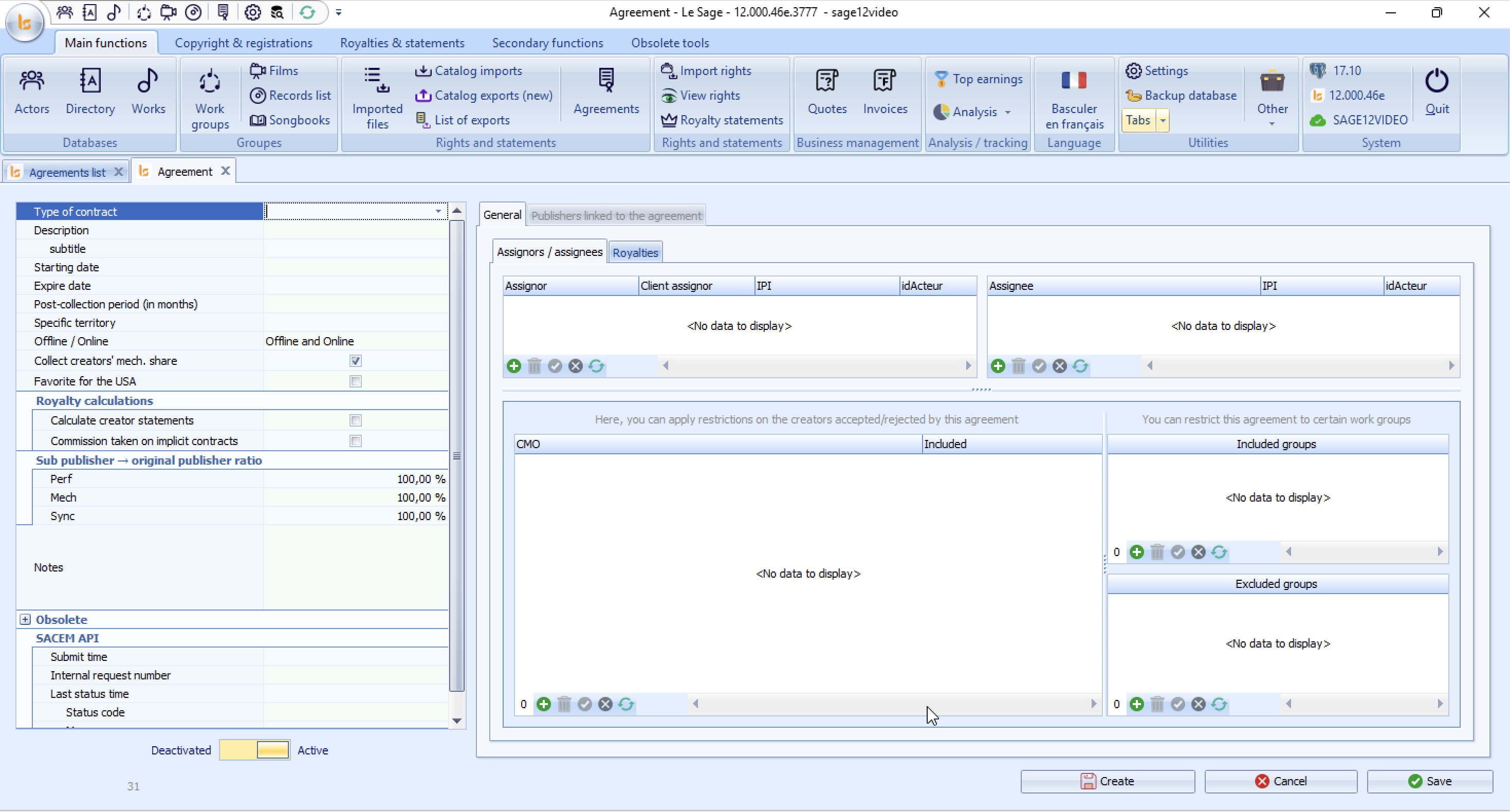
Left Panel: Contract Parameters & Terms
General Parameters
-
Type of contract: Dropdown menu to select the contract classification (e.g., Sub-publishing, Administration, Co-publishing).
-
Description & subtitle: Free text fields to define the title or reference description of the contract.
-
Starting date / Expire date: Effective dates for contract validity. Th expiring date will have for effect to stop applying this contract to send out catalogues.
-
Post-collection period (in months): Set the post-term collection duration (e.g., 6, 12, or 24 months). The contract will apply to royalty distribution until the post collection period is over.
-
Specific territory: Define groups of territories in settings for them to cover the exact territories signed with your client.
-
Offline / Online: Scope configuration (e.g., Offline and Online). Does this contract apply to online and or offline rights.
-
Collect creators' mech. share: Checkbox to include/exclude creator mechanical rights collection.
-
Favorite for the USA: Checkbox to set priority handling for US territories. This option concerns only the ASCAP or BMI representation contracts.
Royalty Calculations
-
Calculate creator statements: Enables automated statement generation for the authors/composers/adaptors/arrangers that will be linked to the publisher in this contract or the following subcontracts.
-
Commission taken on implicit contracts: Controls whether commissions apply automatically to implicit agreements, meaning the co-publishing agreements stated in the copyright.
Sub-publisher → Original Publisher Ratio
Set split percentages applied when transferring collection shares:
-
Perf (Performance rights): Default
100.00 % -
Mech (Mechanical rights): Default
100.00 % -
Sync (Synchronization rights): Default
100.00 %
SACEM API Integration
Module for Sub publishing agreements within SACEM - to get the agreement numbers.
Displays real-time transaction logs when syncing contract data with SACEM:
-
Submit time, Internal request number, Last status time, Status code.
Right Panel: Parties & Restrictions
The main section contains two primary tabs: General and Publishers linked to the agreement.
Assignors / Assignees Tab
Manage rights transfers between parties:
-
Assignor (Left Table): Add or edit transferring parties (
Assignor,Client assignor,IPI,idActeur). -
Assignee (Right Table): Add or edit receiving parties (
Assignee,IPI,idActeur).
Collective Management Organizations (CMO) Restrictions
-
CMO / Included: Define Collective Management Organizations (e.g., SACEM, ASCAP, BMI) of the authors and composers that will define the application or not of this contracts.
Mainly used in the case of ASACP and BMI, the file being sent to MusicMark you have to explain that each CMO deals with their members/ and excludes/includes other affiliations.
Work Group Restrictions
-
Included groups: Restrict this contract to apply strictly to selected work groups or catalogs.
-
Excluded groups: Exclude specific work groups from the agreement's scope.
Table Action Bar: Use the toolbar icons below each table (
+Add, Trash icon Delete,XCancel edit, Refresh) to update list items.
4. Action Buttons (Bottom Right)
-
Create: Initialize a new agreement entry and then save without closing.
-
Cancel: Revert unsaved edits on the active agreement.
-
Save: Save all changes to the database and close the contract.
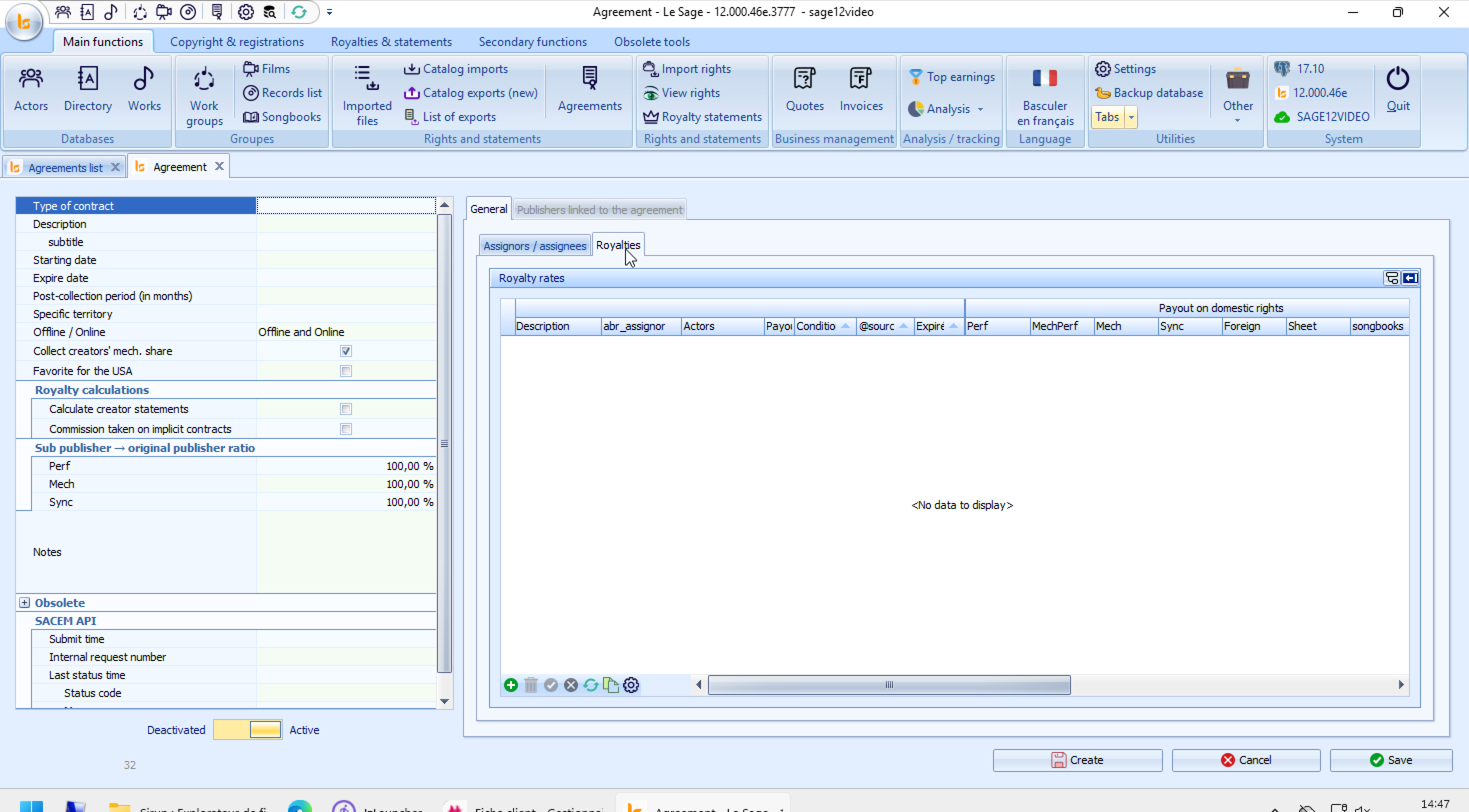
Royalties Tab: Displays the detailed Royalty rates matrix:
-
Key columns include Description, abr_assignor, Actors, Payout on domestic rights (Perf, MechPerf, Mech, Sync, Foreign, Sheet, Songbooks), and expiration criteria.
-
Action Toolbar (Bottom-Left of table):
-
+(Green Plus): Add a new royalty rate entry. -
Trash Can: Delete the selected row.
-
Checkmark: Confirm/Validate row entry.
-
Refresh / Edit Icons: Update or configure existing table parameters.
-
No comments to display
No comments to display