
First steps in Le Sage
You have just purchased Le Sage and do not know where to start. Here are some key steps to get you started with the software.
First settings
Companies
We will not detail each tab here but mainly the first settings necessary to import your catalog.
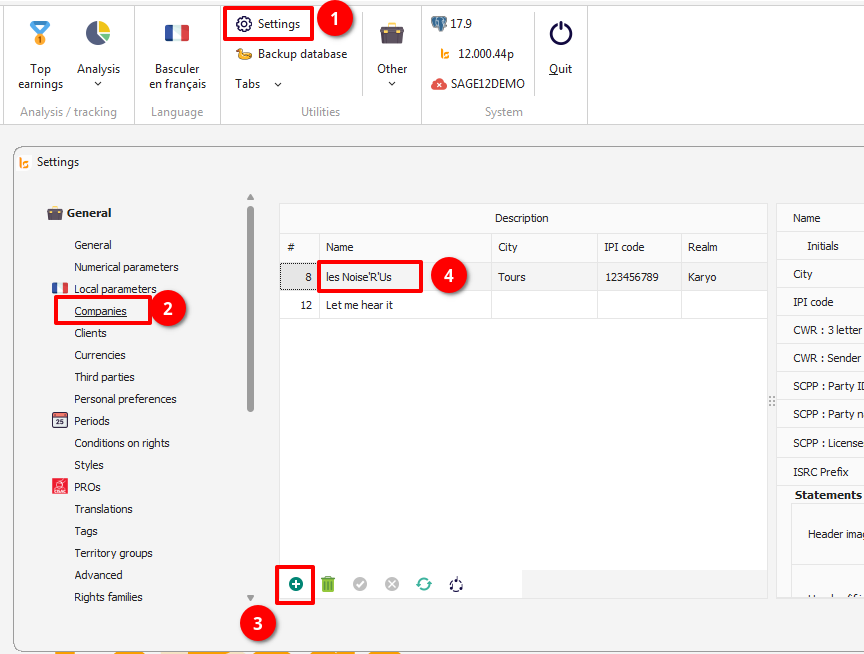
The configuration of the company is necessary to link your works to companies. If you only manage your catalog, and you only have one legal entity, you will only create your company name. To add a company, press the "+" symbol and enter the name of your company. It is not necessary to set all of the available fields right away. These will be used later on for the statements.
Third parties
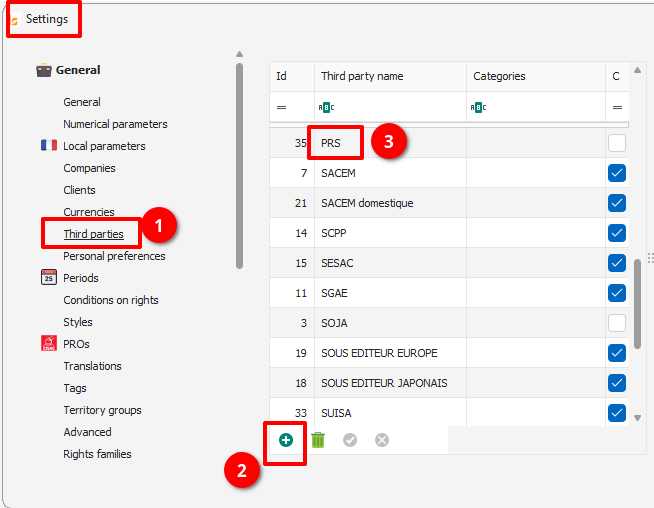
Third Parties are any entity with whom you will exchange data. You are going to want to integrate a first catalog into the database. You must therefore configure the third party that provided you with this catalog. As for the company, press "+" and type the name of the catalog supplier. The configurations on the right will be necessary when exporting your catalogs for this same Third Party.
These two basic settings will get you started.