# Actors
# List of actors
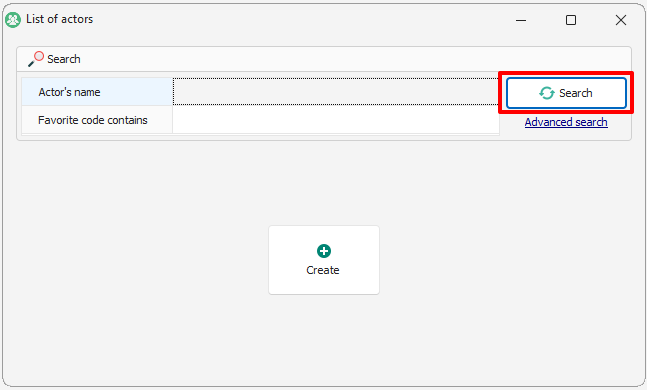
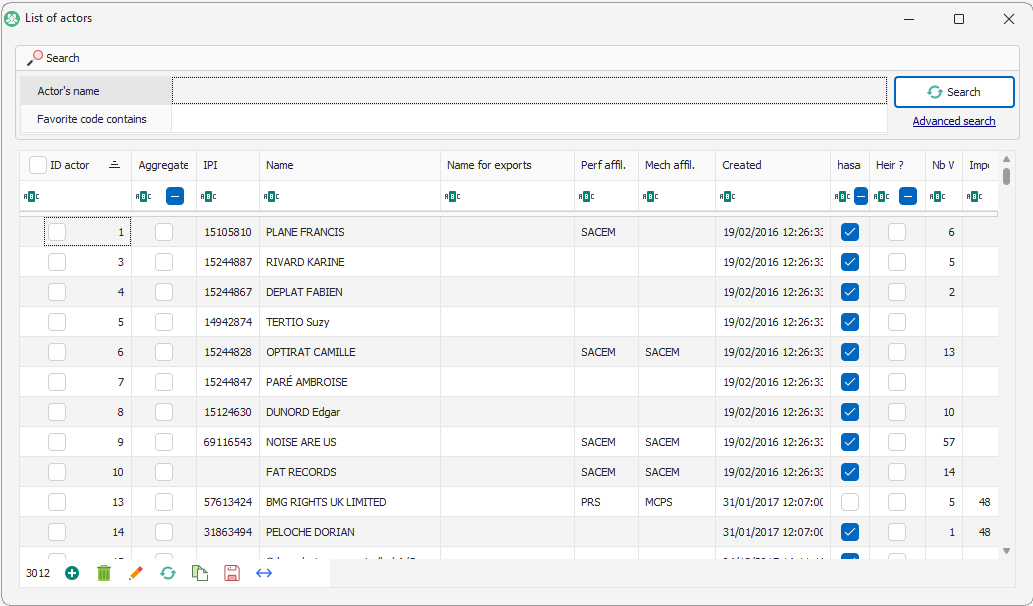
The list of actors is comprised of a search engine and the actual list of actors. To access the list and its functions, you have to launch the search (even empty).
[](https://docs.improvize.eu/uploads/images/gallery/2026-04/6mRimage.png)
The default choice is by name, the search will bring up all the names beginning with what you key in. You can use \* to say that the name contains instead of starts with.
An **advanced search** enables you to find an actor with specific information :
- **Favourite code contains** : the favourite code is the first code entered in Le Sage (via an import or manually). It can be personalised so it automatically chooses the IPI code for instance.
- **IPI code contains** : CISAC identification of an actor.
- **Problems** :
- Unused actors : lists the actors that are not linked to any works nor contracts
- IPI codes duplicates : lists the actors that have IPIs in common
- Name duplicates : lists the actor that have the same name
[](https://docs.improvize.eu/uploads/images/gallery/2026-04/2a4image.png)
If you double-click on one actor you can open its form.
# Editing an actor
The actors form is composed of several tabs:
[](https://docs.improvize.eu/uploads/images/gallery/2026-04/7rAimage.png)
### General
The header with :
- the actor’s **name** : first name and last name
- the favourite **code** : first code imported or chosen.
Generic information concerning the actor
- **Contact details** : address, telephone number, email, social security number. This information will be
- **Identity** : Last name, first name, nickname. Last name and First name can be filled in via the **catalogue fixing Workshop** if the name in the header is properly entered. [Groups - Catalogue fixing workshop](https://endocs.thefreecat.org/sage/basededonnees/atelier_reparations.html#atelier-reparations)
- **Bank account ID**
- **Biography**
### Statements
You can define here through differents options/settings which way the statements of this artist are **calculated** (frame1) and **edited** (frame2)
You can fill here informative fields to personnalise the statements of this actor.
• **Client** : you can link here this actor with the client providing you the catalog. The client could be your own company. You can add new clients in « Settings » → « Clients ».
• **Calculations** :
- You must tick « No social insurance calculations (lives abroad) » if this artist is living abroad / in a foreign country.
- You must tick « Company » if this actor is a legal entity.
**NB** : Those two different options have the same result : the statement calculations will stop with the gross amount.
- If this actor is living abroad, the field « Witholding tax » has to be filled with the correct %. This % concerns all his rights.
• **Statement layout** :
- You must tick « Calculate statements » if you want this actor and his rights to be included in the statement calculation.
- You can tick « Statements in english » if you want it to be edited in english. The translation is automatic but you can still set it up in « Settings » → « Translations »
- You can also tick “View details” to make appear all the payout details about this actor (filled or imported) in his statement.
- If you tick “View summary by type of rights”, you will make appear a table for each work as a payout summary with each type of rights in the statements.
- The “View subtotal by source” box will allow you to see the payout details and subtotal by source in the statements.
- The “View subtotal by type of rights” box will allow you to see the payout details and subtotals by type of rights in the statements.
- The “compact mode”
**NB** : All those “View” options are changing the statement layout in the way of how payouts are edited/presented.
- “Don’t add automatic messages” box prevents all the LeSage preset messages to appear on the statements.
- “Always force a statement on this company” even if for this actor there is no rights you can decide to force the statements to be edited. In this way, you must indicate a company.
- “Force all statements on this company” allows you for a company to gather all the actor’s statements in one.
- “Can receive payments” to allow this actor to receive payments
- Citizenship : this field is purely informative
- **The publishing management** frame allows you to link an actor to a territory and to a PRO he is affiliated to.
- The perf society is the one paying to this actor the perfoming rights, choose it here
- The mech society is the one paying to this actor the mechanical rights, choose it here
**IMPORTANT :** Those two fields must be filled to export CWR to a PRO as a sub-publisher
- **IPI code** =
- Controlled : tick this box if you’re in charge of representing this actor and you collect his rights. He will be automatically inicated as controlled in his works’ copyright.
- Is a major company :
- Legal description : business number, postal adress, etc used to generate/create contracts
- **Business management**
- Can receive invoice
- VAT rate
- Notes : internal notes for your own use
### Codes
This tab shows you all the codes linked to the actor. Those codes could be attached to the actor automatically through importing catalogues but also manually.
You can see several informations here :
- code types : IPI, coad, etc...
- code itself
- the third party providing the code
An actor can have several code from the same type. If this actor has several IPI or Coad code, LeSage will export or fill your documents with the code that as been created in the first place (chronologically speaking). To avoid the wrong code to be chosen so used, **you must define it as “main”**.
### Royalties
The fields of this tab will allow LeSage to fill automatically a work royalties when this actor is linked to this work. Those fields still remain manually editable.
**Special share** : this part is only dedicated to create [special actors](https://docs.improvize.eu/books/le-sage-PUL/page/special-actors "Special actors").
### Works
Here are listed all the works linked to this actor no matter the role he is having. The header frame provides you informations about :
At the bottom left, you find a tool bar allowing you to :
- **Open and modify** with the pencil
- **Refresh** the tab to see the modifications
- **Create a temporary group** with all the selected works ( cf [**workgroups**](https://proj.thefreecat.org/projects/sage-11/wiki/2-work-groups))
- **Save the column settings**
- **Maximize the column size** for a better view
In the **Copyright** section, you can see **the role of this actor** in each work.
In the **Royalties** section, you can see every works on which this actor received rights and so payouts. You can double-click on a work to see more details.
The amount generated column indicates the collected publisher share.
- the company who has paid or will pay
- the closure date
- the gross total master being postponed to the next statement/payout
- the net balance paid or to be paid
In the frame n°2 :
- **Previous balance** : summary of the previous balance. If showing 0, meaning the actor was paid. If the payout was postponed to the next statement, the amount will be indicated
- **Calculation date** : date when the statement was calculated
- **Statement subtitle** : period name of the statement
- **Closure date** : indicated date on the statement for the previous period which is also considered for the next statement calculation.
- **Date on statement** : actual date present on the statement
- **Period date min & max** of the selected period (Settings -- > Periods)
- **Rights** : gross total amount of the rights
- **Special credits** : shows the advance payments or special payouts
- **Gross total (masters rights)** : previous gross rights amount being postponed
- **Net balance (obsolete)** : just forget about it, to be canceled
- **Net balance** : net total amount to be paid through the next statement
- **Email sent** : if the statement was sent by mail directly from LeSage. Not active yet !
- **Notes** : informations for your personnal own use
- **Statement number** : not active yet !
- **Amount earned elsewhere** :
### Payments
Here is the list of the rights, advance and others payouts already paid to this actor.
- [**statements**](https://proj.thefreecat.org/projects/sage-11/wiki/5-statements)
- **adding payments manually here /!\\ THIS INDICATED AMOUNT IS NET /!\\**
**IMPORTANT** : If you want a manual payment to be postponed/integrated to the next statement calculation you must date it from the 1st day of the next statements calculation period
### Credits
Here are the amounts positive or negative (but not rights) you would like to make appear on the statement.
**IMPORTANT :** To integrate those special credits the date (in period) must be the 1st day of the next statement calculation period.
### Succession
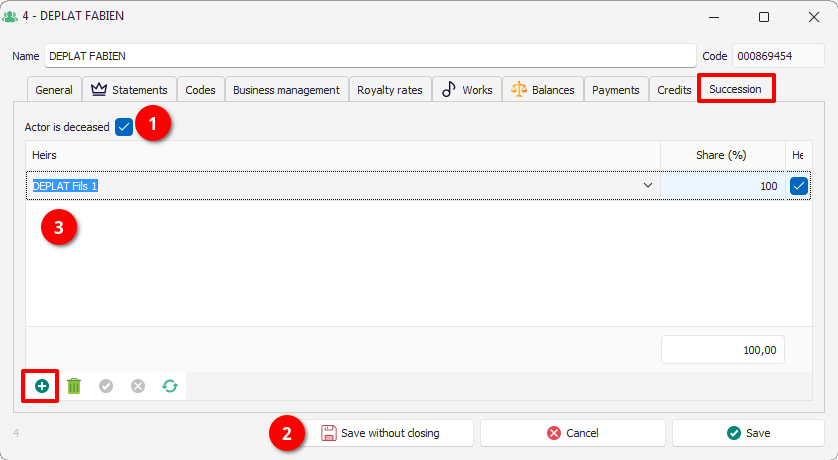
In case of a dead actor, you must fill the beneficiary heir detailed information here :
[](https://docs.improvize.eu/uploads/images/gallery/2026-04/5USimage.png)
1. Tick the "Actor is deceased" box
2. Save
3. Create and add the actor(s) being the heir and new beneficiary of this actor's rights
The Share (%) representing the part being paid to the heir as new beneficiary in case of several heirs for one deceased actor.
**IMPORTANT :** The deceased actor will still have a statement on his behalf and his heir(s) will have a different one with their share(s).
### Aggregate
Grouping or gathering actors allows you to calculate and edit aggregated statements. Concerning mostly the sub-publishers to edit and calculate specific statements for each catalog but also a global or aggregate one.
1. Create a new basic standard actor
2. Go to this tab
3. Tick here the "This is an aggregating actor : statements produced under this name will aggregate the rights of all its members" box
4. The right hand list is filling up automatically with all the actors and you choose the one you want to put in this gathering
# Special actors
## General principle
Whether in a work or in a contract, we could indicate to Le Sage payments to be applied "blindly": we created a group of works for a catalog, we associated a contract which defined that we kept 10% and that 90% was paid to our client and the trick was (more or less) played. This system works very well for sub-publishing but obviously is a big problem for local works, in particular because, depending on the number and the shares of authors, composers and publishers present in each work, this “blind” distribution is unusable.
It is possible to create “virtual” rights holder who will be responsible for distributing the shares according to the copyright data.
Let's take an example :
We create an actor to whom we give an explicit name (this name will be visible only to you) and, in the "Royalties" tab, we ask him to distribute the rights between all the controlled actors. We take the opportunity to give it 100% on all types of rights because, in most cases, that's what you want.
Now, let's fill in a work. We need two lines in the "royalties" part:
- One for the rights which come from your local PRO and which are exclusively intended for you since the other beneficiaries have already been paid on their side ...
- ... and one for direct rights
We do not specify a supplier (in fact this rule will apply regardless of the supplier), we delete the DEP, DRM and Phono parts and we indicate, in the “Copyright sharing key”, that we wish to use the “Mechanical owned” shares in the copyright.
Here is the "Copyright" content of this work: I create a line of direct rights of 1000 € in miscellaneous rights and Le Sage calculates: He did note that the total share of actors checked is 50% and therefore that each person's share is respectively ¼, ¼ and ½. Let's change the copyright to indicate that we control almost everyone (remember that we chose to use the "Mechanical owned" part for our calculations):
And let's recalculate the count: The Sage still distributes the same amount, but this time giving ⅓ to the publisher (25% out of 75% in total) and ⅙ to each of the authors / composers (12.5% out of 75% in total). Of course, at the scale of a work it's not very interesting but it also works on contracts, of course.
We've seen the easiest way to share here, but there are other cool things you can do. You have seen that we can create rights holders capable of distributing rights especially between authors / composers or only between publishers. Let's go back to the "Copyright" configuration from the beginning: We create two rights holders responsible respectively for distributing the rights between the A / C and between the Publishers. Next, let's modify our “Royalties” area as follows: The distribution "All actors" is empty for the various rights but distributed at 10/90 between the A / C and the Publishers (one can imagine, for example, that for the Songbooks, the publishers keep a majority of the sums to amortize the costs. Manufacturing) : The publisher keeps 90% of the sum and the A / C split the remaining 10% in proportion to their "Mechanical" shares.
## Special actor setting
We are going to create 3 actors: 1 for the sharing to take place:
- between controlled songwriters
- between controlled actors (regardless of their role)
- between controlled publishers
All the actors will not be useful perhaps but know that it is possible to create them. In the list of actors, click on "Create". Give it the name you want: here: \* split between A/C controlled (the asterisk will allow you to have the actor at the very beginning of the list of actors). Go to the Royalties tab and check "Share between controlled authors/composers.
Your actor allowing you to split between the songwriters (arrangers and adapters also) according to one of the sharing keys issued by copyright is finished. The operation must be repeated to create the other two, by checking the special sharing according to the name you give it.