At launch: the connect rule and its messages
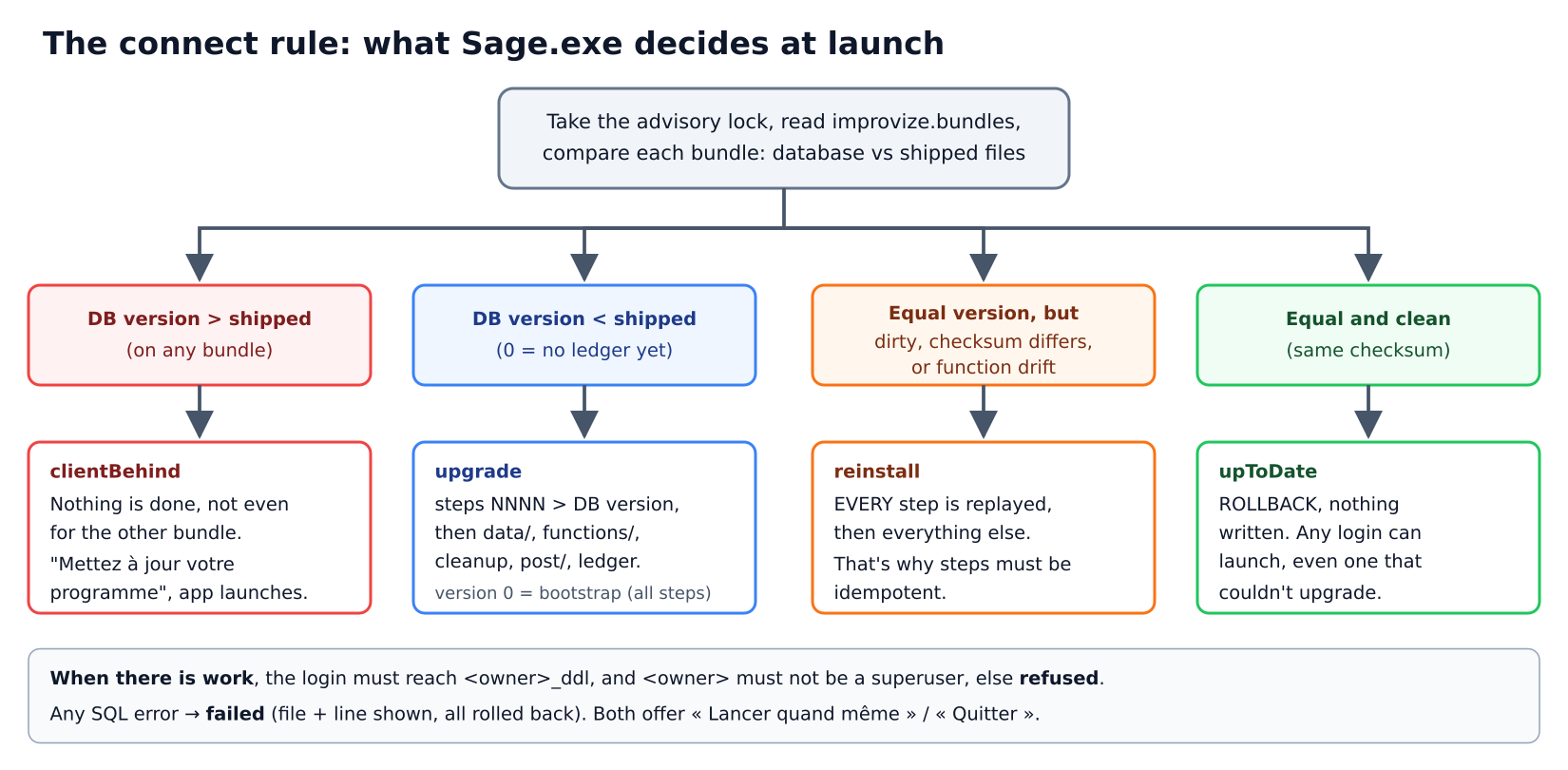
What Sage.exe does with the bundles at each launch (TDM.ApplyBundles → RunConnectRule in catBundleUpgrade.pas), and how to read what went wrong.
Startup sequence
- Read the parameters (
srv= owner= user= pwd= db=, plussqlroot=anddev=1), connect as the login. - Licence check.
- Connect rule, one transaction: wait for the advisory lock (another PC may be upgrading: splash with Annuler, gives up after 5 minutes), read the ledger, decide, apply.
- Write the legacy stamp
config.lastversiondbupdate(only after upToDate/upgraded, never lowered). - Open the datasets, as the plain login.
Roles
<owner>(e.g.izowner): owns the tables. Steps,data/andpost/run as this role.<owner>_ddl: owns the managed functions and the ledger, so an old exe running as<owner>can no longer drop or overwrite them.functions/runs as this role.- Created per server by
common/roles/ddl-roles.sql(operator, seecommon/roles/RUNBOOK.md); rerun it when a new login is added, or that login gets refused as soon as there is work to do.
Messages and what they mean
| Result | Cause | Fix |
|---|---|---|
| clientBehind "Quelqu'un de votre équipe utilise une version plus récente…" | The database has a higher bundle version than this exe ships. | Update the exe. On a test DB: lower version in improvize.bundles. |
refused noddlrole / notddlmember | <owner>_ddl is missing, or the login isn't a member. | Run ddl-roles.sql on the server. |
refused ownersuperuser | The owner role is a superuser (e.g. owner=cat locally). | Use a non-superuser owner role. |
| failed "L'installation de Le Sage est incomplète : réinstallez le programme." | A bundle folder is missing under sqlroot (default: the exe's folder). | Reinstall, or fix sqlroot=. |
| failed "cette base n'est pas une base Le Sage" | Step 0001's precondition raised IZ001: empty or non-Le Sage database. | Wrong db=; empty databases come from lesage/makedb/ only. |
failed foreignowner (repair query shown, with Copier) | A managed function is owned by someone other than <owner> / <owner>_ddl. | Run the shown ALTER FUNCTION … OWNER TO as superuser. |
| failed with a file and line | An SQL error in that bundle file. Everything was rolled back. | Fix the file (next version if it was released). |
| failed lock wait | Another PC held the upgrade lock for more than 5 minutes. | Retry; check pg_stat_activity (application_name = lesage-delphi 13.000.xx (login@PC)). |
On refused and failed the user can choose Lancer quand même (runs with whatever the database has, some functions may fail) or Quitter (default).
Inspecting a database
SELECT bundle, version, checksum, dirty, appliedat, appliedby FROM improvize.bundles;
SELECT bundle, fromversion, toversion, kind, appliedat, appliedby
  FROM improvize.bundlehistory ORDER BY id DESC LIMIT 20;   -- kind: upgrade | reinstall | reload
Compare a checksum with the files: npm run check -- manifest ../lesage/sql (in common/) prints the per-file manifest and the bundle checksum.